

Linux 生态是开源的,所以调试所需的源码和 debug symbol 可以很方便地获取到。方便到什么程度?如果使用 Ubuntu Jammy 以上版本,那么:
- apt source
获取到源码 [http://ddebs.ubuntu.com](http://ddebs.ubuntu.com)提供了打包好的 debug symbol[https://debuginfod.ubuntu.com](https://debuginfod.ubuntu.com)在线提供某个组件或库的 debug symbol
ddebs 下载 debug symbol#
Ubuntu 发布的二进制文件的 debug symbol 存储在 [debuginfod.ubuntu.com](https://debuginfod.ubuntu.com) 中,并且以 -dbgsym 结尾,如 wget 对应的 debug symbol 包名为 wget-dbgsym。
在 /etc/apt/sources.list.d/ddebs.list 中加入如下内容:
deb http://ddebs.ubuntu.com jammy main restricted universe multiverse
deb http://ddebs.ubuntu.com jammy-updates main restricted universe multiverse
deb http://ddebs.ubuntu.com jammy-proposed main restricted universe multiverse
ddebs 的密钥环属于 ubuntu-dbgsym-keyring 这个包,所以在 apt update 之前需要 sudo apt install ubuntu-dbgsym-keyring
然后就可以下载 -dbgsym 包了,所有调试符号被安装在 /usr/lib/debug/ 下,如 wget-dbgsym
$ dpkg -L wget-dbgsym
/.
/usr
/usr/lib
/usr/lib/debug
/usr/lib/debug/.build-id
/usr/lib/debug/.build-id/ef
/usr/lib/debug/.build-id/ef/1ccd6daeaf8bb406137eb3b9890a863348505f.debug
/usr/share
/usr/share/doc
/usr/share/doc/wget-dbgsym
此时 使用 GDB 调试 /usr/bin/wget 会发现 GDB 自动读取了 wget 的debug symbol。
root@rockpin10bc:~# gdb /usr/bin/wget
GNU gdb (Ubuntu 12.1-0ubuntu1~22.04) 12.1
Copyright (C) 2022 Free Software Foundation, Inc.
License GPLv3+: GNU GPL version 3 or later <http://gnu.org/licenses/gpl.html>
This is free software: you are free to change and redistribute it.
There is NO WARRANTY, to the extent permitted by law.
Type "show copying" and "show warranty" for details.
This GDB was configured as "aarch64-linux-gnu".
Type "show configuration" for configuration details.
For bug reporting instructions, please see:
<https://www.gnu.org/software/gdb/bugs/>.
Find the GDB manual and other documentation resources online at:
    <http://www.gnu.org/software/gdb/documentation/>.

For help, type "help".
Type "apropos word" to search for commands related to "word"...
Reading symbols from /usr/bin/wget...
Reading symbols from /usr/lib/debug/.build-id/ef/1ccd6daeaf8bb406137eb3b9890a863348505f.debug...
(gdb)
ubuntu 在线提供 debug symbol#
使用Ubuntu 提供的 debuginfod 服务那就更方便了,只需要
- 在设置环境变量
DEBUGINFOD_URLS为"https://debuginfod.ubuntu.com"。 - GDB 设置
set debuginfod enabled on - 使用 file 加载需要调试的文件,如 file /usr/bin/htop,GDB 自动从 debuginfod 上下载对应的 debug symbol 到
${HOME}/.cache/debuginfod_client/中。
ihexon@shell~> set -x DEBUGINFOD_URLS "https://debuginfod.ubuntu.com"
ihexon@shell~> gdb
GNU gdb (Ubuntu 12.1-0ubuntu1~22.04) 12.1
Copyright (C) 2022 Free Software Foundation, Inc.
pwndbg> set debuginfod enabled on
pwndbg> file /usr/bin/htop
Reading symbols from /usr/bin/htop...
Downloading 0.43 MB separate debug info for /usr/bin/htop
Reading symbols from /home/ihexon/.cache/debuginfod_client/d5c60ef81f367defb890a7a080ea27a209139ef7/debuginfo...
当然也可以在 ~/.gdbinit 写入 set debuginfod enabled on 来确保 GDB 每次都使用debuginfod 服务。
关闭 debuginfod 服务只需要在 GDB 内执行 set debuginfod enabled off
debuginfod 是怎么找到 对应的 debug symbol 的#
debuginfod 依赖于一个唯一的哈希值来标记二进制文件和共享库(称为 Build-ID)。 这个 160 位 SHA-1 哈希值由编译器生成,可以使用 readelf 工具进行查询:
ihexon@shell ~> readelf -n /usr/bin/bash

Displaying notes found in: .note.gnu.build-id
  Owner                Data size        Description
  GNU                  0x00000014       NT_GNU_BUILD_ID (unique build ID bitstring)
    Build ID: 4dadac332a3aaef2b0eca910734ed6f8834d0b9b

Displaying notes found in: .note.ABI-tag
  Owner                Data size        Description
  GNU                  0x00000010       NT_GNU_ABI_TAG (ABI version tag)
    OS: Linux, ABI: 3.7.0
当gdb 调试程序时,GDB 会将程序的 Build-ID 发送到 debuginfod 服务器也就是Ubuntu 的 https://debuginfod.ubuntu.com,debuginfod 服务器检查是否具有该二进制文件/库的相应调试信息。 如果有,那么它将通过 HTTPS 将调试符号发送回 GDB。
所以大陆玩家可能还需要设置 http_proxy/https_proxy 顺利访问到 debuginfod 服务。
在调试的同时找到对应的源码#
- Ubuntu 中使用 apt source
来获取对应的源码包,比如 apt source wget,apt 工具会自动解压并且打上上 Ubuntu 的 patch。 - 使用
set substitute-path . <src-dir>映射其源码路径就可以了,如set substitute-path . /home/ihexon/wget-1.21.2。 - 使用 list 就可以查看源码了
BUGs#
似乎是 dbgsym 包的问题,GDB 在 info functions <function_name> 的时候显示的是错误的,如
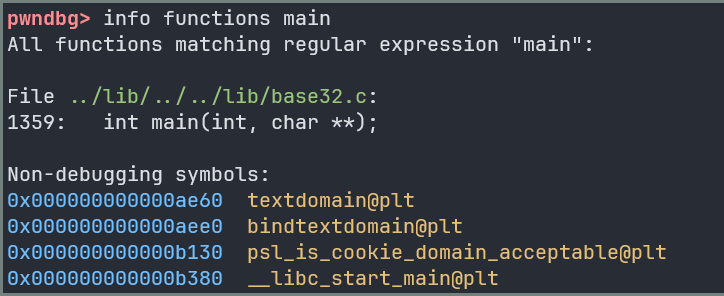
main 函数咋会在 ../lib/../../lib/base32.c 中?并且base32.c 根本就没有 1359 行。